

BOM Review
Check switch, AP, gateway, optic and cable compatibility before ordering.
Enterprise Network Design and Procurement Readiness
More Guests. More Devices. A More Reliable Network.
Reference architecture and BOM guidance based on your actual site requirements.

Before recommending hardware, we review the devices, traffic, power demand, cabling and growth requirements behind your project.
Check switch, AP, gateway, optic and cable compatibility before ordering.
Validate powered-device load, PoE standards, reserve capacity and PoE-out requirements.
Estimate AP type and quantity using floor layout, client density and application demand.
Evaluate 1GbE, Multi-Gig and 10GbE requirements, including optical-module compatibility.
Receive a project-specific equipment recommendation and commercial quotation.
Peak-Traffic Readiness
Strong Wi-Fi signal alone does not confirm that the complete network path has enough capacity.
High airtime use and retries reduce application performance.
Missing segmentation and guest policies increase security and congestion risk.
APs, cameras and phones may exceed the available switch power budget.
A 100Mbps or heavily utilized 1GbE link can limit a higher-capacity AP.
AP, CCTV, IPTV and wired traffic may converge on one constrained path.
Regional Project Planning
We review technical and procurement inputs for projects in North America, Europe, the Middle East, Africa, South Asia and Latin America. Product availability, compatibility, delivery options, taxes or import requirements, and local deployment support are confirmed per destination and project.
High-density hospitality, retail, office and campus planning with PoE capacity, multi-gigabit access, controller licensing and uplink resilience reviewed against the site brief.
Multi-site and multi-floor designs reviewed for product availability, power-supply requirements, management platform fit and fiber or transceiver compatibility by destination.
Hospitality, campus and venue networks assessed for dense Wi-Fi, fiber risers, PoE load, outdoor-device requirements and primary or backup WAN design.
Business and campus projects reviewed for WAN resilience, centralized management, spares planning, power budgets and practical procurement constraints.
Office, education, warehouse and retail environments assessed for client density, PoE growth, multi-gigabit access and fiber aggregation requirements.
Hospitality and multi-site retail projects reviewed for access-layer standardization, secure segmentation, management options and destination-specific logistics.
This page describes an engineering review process, not guaranteed product availability, installation coverage or delivery time in every country. Final scope is confirmed after the site and procurement requirements are reviewed.
Start with the closest venue pattern. Final quantities, management choices and hardware are validated against the actual project data.
 Café / Restaurant
A compact commercial network for guest Wi-Fi, POS, cameras and staff devices.
 Retail Store
Segment guest, POS, staff, CCTV, signage and IoT traffic with managed policies.
 Small Hotel / Motel
Plan wireless coverage, room services and floor uplinks as one multi-layer network.
 Student Housing / Coworking
Support dense user populations, shared spaces and floor-by-floor access infrastructure.
Reference ranges only. Final AP quantities, port counts and uplink speeds depend on floor plans, wall materials, active-client demand, PoE load and application traffic.
Use these designs as planning starting points—not fixed packages.
Cafés, small restaurants, boutiques and compact retail stores
Restaurants, medium retail stores, coworking spaces and boutique hotels
Hotels, motels, student housing and multi-floor commercial properties
Reference architecture only. Final hardware depends on device count, floor plan, PoE budget, cabling distances, traffic demand and management requirements.
Compare the planning inputs, validation checks and deliverables for each reference design. Final hardware is confirmed against your site requirements.

AP quantity depends on active-client demand, RF conditions, floor layout and application use—not floor area alone. Switch selection must satisfy both physical port count and the maximum planned PoE load.

AP quantity depends on active-client demand, RF conditions, floor layout and application use—not floor area alone. Switch selection must satisfy both physical port count and the maximum planned PoE load.

AP quantity depends on active-client demand, RF conditions, floor layout and application use—not floor area alone. Switch selection must satisfy both physical port count and the maximum planned PoE load.
A reliable commercial network requires compatible access points, PoE switching, multi-gigabit links, fiber uplinks, gateways and management across the complete data and power path.
Internet access, firewall policy, VPN, WAN failover and inter-VLAN controls.
Explore Routers & FirewallsConnect and power APs, cameras, phones and IoT devices with managed VLAN and monitoring capabilities.
Explore PoE SwitchesIndoor ceiling, wall-plate and outdoor AP options for different coverage and wired-service requirements.
Explore Wi-Fi 6 & Wi-Fi 7 APsAggregate floor and zone traffic with appropriate uplink capacity and expansion headroom.
Explore Aggregation SwitchesMatch speed, distance, fiber type and switch compatibility for inter-floor or inter-building links.
Explore Optical ModulesBuild reliable riser and rack connections with suitable LC, MPO, OS2 and multimode fiber options.
Explore Fiber CablingAccess-Layer Readiness
A high-density network is a connected system. The access points, switch ports, power supplies, uplinks, gateway capacity, management platform and optical links must be reviewed together.
Review client mix, channel use, expected concurrency, AP placement, controller or cloud management, and the uplink rate required by each AP model.
Validate per-port class, total switch PoE budget, PSU capacity, redundancy target, cable distance and startup power for APs, cameras, phones and IoT endpoints.
Confirm where 2.5G, 5G or 10G copper access is justified, then check switch backplane, uplink capacity, cabling category and endpoint negotiation support.
Match SFP or SFP+ speed, fiber type, connector, distance and platform compatibility for floor risers, buildings and aggregation links.
Size WAN, VPN, security policy, VLAN routing, failover and management requirements before selecting the gateway and wireless control model.
Check switch, PSU, licenses, optics, patch cables, mounting parts, lifecycle status and destination constraints before the quote is finalized.
Cisco, Huawei, Ruijie, H3C and NSComm can address different network layers and procurement requirements. Model availability, licensing, lifecycle, controller or cloud compatibility, regulatory requirements and support expectations are checked per project; there is no universal interchangeability.
A structured review helps prevent port, power, uplink and compatibility mistakes before purchase.
Send your business type, floor layout, device count, existing equipment and project deadline.
We review AP capacity, VLAN design, PoE power, switch ports, uplinks and management requirements.
We check switch, AP, gateway, transceiver, cable and software-management compatibility.
Receive a reference topology, equipment recommendation and project quotation based on the supplied information.
Planning, compatibility, logistics and deployment support across the network lifecycle.
Compare suitable switching, wireless, routing and optical options across multiple enterprise networking brands.
Validate port count, PoE load, uplink capacity and hardware compatibility before purchase.
Coordinate equipment availability, consolidated shipment and project delivery requirements.
Receive configuration guidance, troubleshooting support and follow-up assistance for purchased equipment.
Use proven engineering principles and technical guides to validate the architecture before deployment.

Different deployment scenario; applicable aggregation, PoE and compatibility principles shown.
View Case
Different deployment scenario; applicable multi-floor capacity and redundancy principles shown.
View Case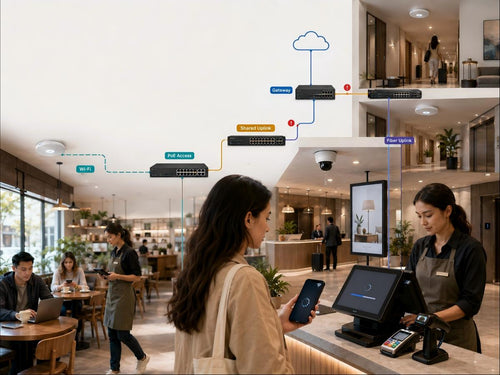
A systematic method for identifying RF, PoE, access-link, uplink and WAN bottlenecks.
Read the Guide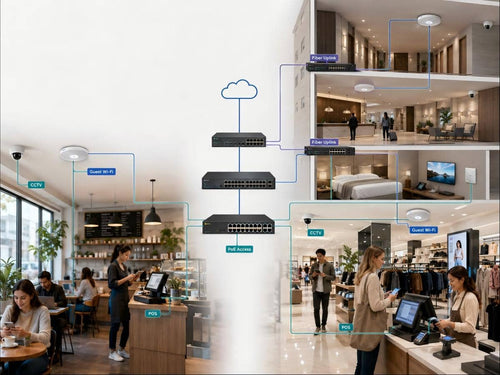
Reference designs for cafés, retail stores and multi-floor hospitality properties.
Read the GuideUse the checklist to gather venue, client, PoE, uplink, WAN and management requirements. Add known device quantities to the BOM input workbook so an engineer can review the PoE budget, model candidates, PSU and uplink items, compatibility risks and quote.
Project Qualification
Provide the information you already have. Our engineers can review the reference architecture, PoE requirements, uplink design and equipment compatibility.
Common planning questions for commercial Wi-Fi, PoE and uplink projects.
AP quantity cannot be determined from floor area alone. It should account for peak active clients, wall materials, room layout, frequency bands, application demand and outdoor coverage. Larger or more complex sites should use predictive RF planning and post-installation validation.
Add the maximum planned input power of all APs, cameras, phones and PoE-out loads, then include appropriate reserve for expansion and required failure modes. Physical port count and total PoE capacity must be calculated separately.
Count Day-1 access ports, dedicated uplinks and spare capacity, then validate the PoE budget. A 48-port switch is appropriate when expected expansion, distribution or maintenance requirements justify the additional capacity.
No. Use measured or forecast AP traffic, local application demand and growth requirements. A 1GbE link may remain appropriate for moderate-load deployments, while 2.5GbE or 5GbE is useful when individual AP uplinks require more capacity.
Evaluate 10GbE when aggregate AP, CCTV, IPTV, wired-user and application traffic—or required growth headroom—makes 1GbE insufficient. Bandwidth capacity and redundancy should be evaluated as separate design decisions.
Yes. Submit the existing BOM, topology or equipment list. The review can cover port count, PoE power, AP and switch compatibility, uplink speed, optical modules and cabling requirements.
Send your floor plan, device list or existing BOM for a project-specific network review.