




 https://www.linkedin.com/company/network-switch/


- 1. Understanding Power over Ethernet (PoE) and Network Switches: The Basics You Should Know
- 2. Explore Available PoE Switch Options: Which Switch Suits Me Best?
- 3. Why PoE Switches Are Essential in Modern Network Infrastructure?
- 4. Common Devices Powered by PoE Switches
- 5. PoE Switch Limitations: What Should Be Considered Prior to Selecting One
- 6. PoE Network Switches | Top 5 Brands
- 7. Selecting the Right PoE Switch for Your Networking Needs
- 8. Why are PoE Switches Important for Today's Networking?
- 9. Frequently asked questions (FAQs)
Power over Ethernet can deliver DC power and Ethernet data over supported copper cabling, but the endpoint class, power at the source, power available at the device, cable, length, bundle temperature, and total switch budget must all be checked. Use Cisco's PoE overview, the network switch hub, and the management comparison.
Understanding Power over Ethernet (PoE) and Network Switches: The Basics You Should Know
What Is PoE (Power over Ethernet)?
PoE, or Power over Ethernet, is a technology which enables Ethernet cables to transport electrical power as well as data for remote devices over one cable - eliminating the need for separate power sources and streamlining network infrastructure by consolidating both functions into one solution.
IEEE 802.3af, 802.3at, and 802.3bt define different PoE types and power levels. Cisco's overview describes Type 4 as up to 90 W at the power source; less power is available to the powered device after cable loss. Verify both PSE and PD ratings instead of using one wattage for every link.

What Is a Network Switch?
A network switch is an electronic device used to link multiple devices in a local area network (LAN), allowing them to communicate. It works by routing data packets directly to their destination device using their MAC address rather than broadcasting to all connected devices at once like hubs do.
PoE switches not only manage network traffic, but they also supply electrical power over Ethernet cables - simplifying device installations and installation. In PoE devices, one cable serves both functions simultaneously allowing devices to be powered without needing separate power sources.
Explore Available PoE Switch Options: Which Switch Suits Me Best?
PoE switches come in various configurations to meet specific needs. Among these are:
Unmanaged PoE Switches: These switches offer convenient plug-and-play solutions for small networks or simple installations with no configuration necessary - simply connect devices directly to them to get going!
Managed PoE switches offer advanced features, including the ability to monitor and configure network performance, manage VLANs, prioritize traffic and ensure security. They are an ideal solution for larger networks that need greater control and flexibility.

Smart PoE Switches: These switches offer an affordable middle ground between unmanaged and managed switches, offering some basic management features such as VLAN support and QoS quality of service but are less complex and less costly than fully managed models.
PoE Injector Switches: These switches enable devices that don't natively support PoE by injecting power through standard Ethernet cables to add PoE functionality for devices such as IP cameras or wireless access points.
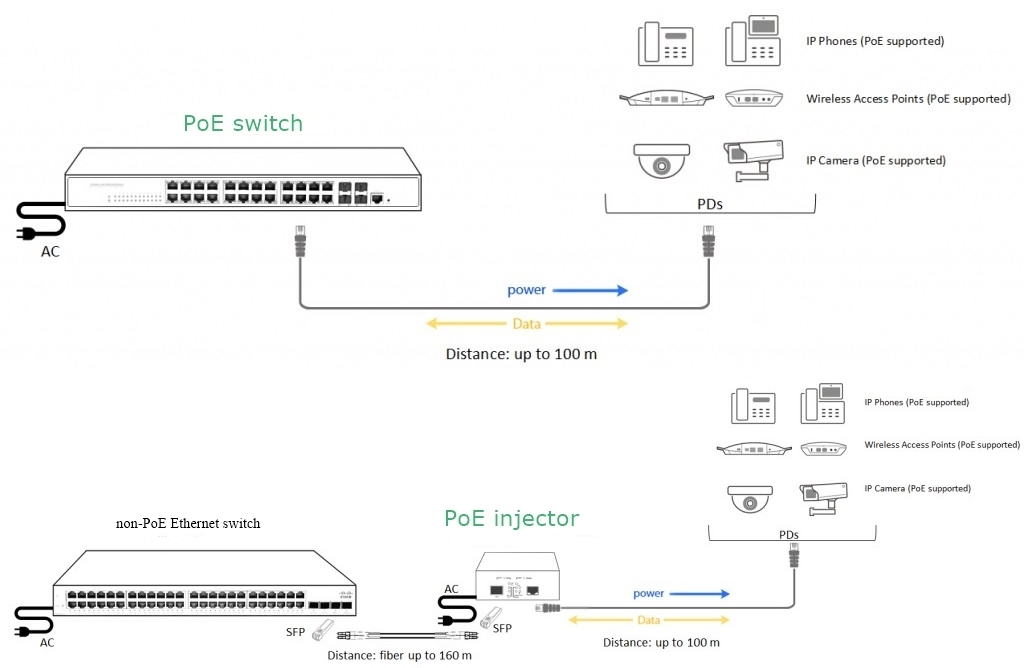
Why PoE Switches Are Essential in Modern Network Infrastructure?
PoE switches offer numerous advantages that make them essential components of modern network infrastructure:
Simplified Cabling: PoE cables combine power and data transmission in one cable, making installation simpler and reducing the number of cables necessary in a network - this feature is particularly advantageous in tight spaces where providing power outlets is difficult.
Cost Savings: By eliminating the need for separate power cables and outlets as well as electrical installations, PoE switches reduce both material and labor costs in network setup.
Flexibility: PoE allows devices like wireless access points and IP cameras to be installed even where there are no power outlets nearby, giving more freedom in where devices can be placed without being restricted by proximity to power sources.
Centralized Power Management: With Power over Ethernet (PoE), power is centrally managed through the switch, making it simpler to monitor, troubleshoot and address power-related issues. Furthermore, maintenance becomes much simpler as all devices can be powered off/on remotely through this method.
Scalability: PoE makes adding new devices much simpler; simply connect the new device directly to a PoE switch for both power and data without needing extra infrastructure.

Common Devices Powered by PoE Switches
PoE switches are great for powering devices that need both electricity and data. Here are some examples:
IP Cameras: PoE simplifies surveillance installations by simultaneously providing both power and data to cameras via one Ethernet cable, eliminating the need for additional adapters and facilitating installation in remote or outdoor locations.
Wireless Access Points (WAPs): PoE switches provide Wi-Fi access points with power, enabling flexible placement without requiring separate electrical outlets - perfect for expanding wireless coverage in large offices and warehouses.
VoIP Phones: Many modern office phone systems use VoIP technology. PoE enables these phones to transmit both data and power at the same time, making setup much simpler while eliminating extra power cables.
Networked Lighting: Smart buildings and industrial environments make use of PoE-powered LED lighting systems, which are both energy-efficient and easy to control from across the network.
Access Control Devices: PoE can make powering access control devices such as card readers, biometric scanners and other security systems simpler while guaranteeing reliable operation.

PoE Switch Limitations: What Should Be Considered Prior to Selecting One
While PoE switches offer many benefits, they also come with some drawbacks:
Power Limitations: Unfortunately, PoE offers only limited power, meaning some high-powered devices might not be supported under older standards such as 802.3af. For such devices, PoE+ (802.3at) or PoE++ (802.3bt) standards should be preferred for best results.
Distance Limitations: Ethernet cables are limited to a maximum length of 100 meters (appox 328 feets). Beyond this point, signal degradation may occur, necessitating repeaters or fiber optic solutions in order to extend coverage.

Device Compatibility: Not all devices can support power over Ethernet (PoE). Devices designed specifically to accept power must meet certain standards, so making sure device compatibility is a key consideration in setting up a PoE network.
Heat Generation: PoE switches that power multiple devices can generate extra heat, necessitating appropriate cooling mechanisms in high-density or industrial applications.
PoE Network Switches | Top 5 Brands
The following brands are examples, not a verified ranking. Compare exact current PIDs using the same port, power, uplink, management, environmental, support, lifecycle, and price requirements.
Cisco: evaluate exact PoE switch PIDs by port standard, per-port capability, total budget, power supplies, redundancy, software, management, support, and current lifecycle; no family-wide superiority claim is made here.


Ubiquiti Networks: verify exact ports, PoE type and budget, controller requirements, software support, redundancy, environment, warranty, and current price for the intended site.
TP-Link: verify the exact model's PoE budget, management tier, VLAN and security functions, uplinks, environment, software support, warranty, and current quote.
Netgear: validate the exact product's PoE standard, total budget, management features, uplinks, environment, software, warranty, lifecycle, and current quote.
Ruijie: validate the exact PID's PoE standard and budget, management platform, licenses, uplinks, environment, software, support, lifecycle, and current quote.
Selecting the Right PoE Switch for Your Networking Needs
Here are some things to consider when choosing the best PoE switch for your network:
Choosing the Right Power: Check that the switch will deliver enough power for your devices — be it standard PoE or PoE+.
Port Count: Opt for a switch with sufficient ports for all your devices.
Management Features: Managed switches offer greater control over your network, but unmanaged switches are more basic and often cheaper.
Network Speed: Consider your network speed (for example, 1Gbps or 10Gbps) and select a PoE switch that can accommodate the bandwidth requirements for your data traffic.

Why are PoE Switches Important for Today's Networking?
PoE switches play a crucial role in modern networks by delivering both power and data through a single Ethernet cable. They simplify installations, cut costs, and provide greater flexibility, making them very beneficial. Whether you're launching a small business network or expanding a larger one, PoE switches can greatly improve your network's efficiency and ability to grow.
If you’re interested in PoE solutions for your network, think about reaching out to one of the top brands mentioned earlier for more details on their products. For additional information, don't hesitate to contact our sales team for tailored guidance in choosing the right PoE switch for your needs.
Will a PoE switch "fry" my non-PoE devices, like my laptop or a standard printer?
Not at all! Standard PoE switches are "smart." Before sending any electrical juice down the cable, the switch performs a quick digital handshake with the connected device. If your device doesn’t ask for power (like a normal PC), the switch will only send data. It’s completely safe and won't damage your non-PoE hardware.
What actually happens if I plug in too many devices and max out the switch's power?
If you exceed the "Total PoE Power Budget" of the switch, the switch has to make a tough choice to protect itself. Usually, a managed switch will start cutting power to lower-priority ports to keep your most critical devices running. To avoid a scenario where your security cameras randomly shut off, always calculate your total wattage before buying-don't just look at the "per-port" maximum!
PoE, PoE+, and PoE++: Which one do I actually need?
It comes down to how much power your specific devices draw:
Standard PoE (802.3af - 15.4W): Great for basic VoIP phones and simple indoor security cameras.
PoE+ (802.3at - 30W): The sweet spot for most modern tech. You'll need this for PTZ (pan-tilt-zoom) cameras, video IP phones, and Wi-Fi 5 or Wi-Fi 6 access points.
PoE++ (802.3bt - 60W to 100W): The heavy hitter. Reserve this for power-hungry devices like high-end Wi-Fi 7 access points, digital signage screens, or specialized industrial equipment.
How far can I run a PoE cable before the power drops off?
The golden rule for standard Ethernet (with or without PoE) is 100 meters (about 328 feet). If you try to go further, you'll experience voltage drop and data loss. Need to go further? You have options: You can install an inline PoE Extender, turn on the switch's "Extend Mode" (which drops data speed to 10Mbps but pushes power up to 250 meters for cameras), or use fiber optic cabling with a media converter for long campus runs.
Should I buy a managed or unmanaged PoE switch for an IP camera setup?
If you are just hooking up a few cameras for a small retail shop, an unmanaged switch is perfect-it's cheap, plug-and-play, and requires no IT knowledge. However, if you are wiring a corporate office or a large warehouse, absolutely go managed. Managed switches let you securely separate your camera video traffic from your normal internet traffic (using VLANs) and allow you to remotely reboot a frozen camera from your desk, saving you a trip up a ladder.
Do I need to buy special, expensive ethernet cables for PoE?
You don't need cables marketed "specifically for PoE," but the quality of your cable matters immensely. While standard Cat5e works for basic PoE, we strongly recommend using pure solid copper Cat6 cables (avoid cheap CCA - Copper Clad Aluminum). Higher power from PoE+ and PoE++ generates heat inside the cables, and pure solid copper handles that heat safely while minimizing power loss over distance.
Did this article help you or not? Tell us on Facebook and LinkedIn . We’d love to hear from you!
Frequently Asked Questions
Q1: What is a PoE switch?
A: A PoE switch can provide Ethernet connectivity and standards-based DC power to compatible powered devices. Review the official PoE overview and exact switch data sheet.
Q2: What is the difference between PoE, PoE+, and PoE++?
A: They refer to different IEEE PoE types and power levels. Confirm power at the source and minimum power at the device for the exact standard; do not treat a marketing label as the complete power design.
Q3: How do I calculate the PoE budget?
A: Sum each endpoint's required class or measured peak, include startup and design margin, then compare it with the switch's available budget under the intended PSU and redundancy mode. Per-port maximum and total budget are separate limits.
Q4: Can a PoE switch damage a non-PoE device?
A: Standards-compliant PoE equipment performs detection before applying power. Passive or proprietary power systems may behave differently, so verify both endpoints, pinout, voltage, and cabling.
Q5: Which PoE switch should I buy?
A: Select by exact endpoint count, speed, PoE class, total budget, uplinks, VLANs, management, power redundancy, environment, support, and lifecycle. Use the switch selection checklist and compare current switch options only after requirements are documented.


